
Google Ads Management: The Complete Small-Business Guide
Search, Display and YouTube campaigns that waste nothing: account structure, keyword strategy, ad copy, conversion tracking, budgets and weekly optimization routines.
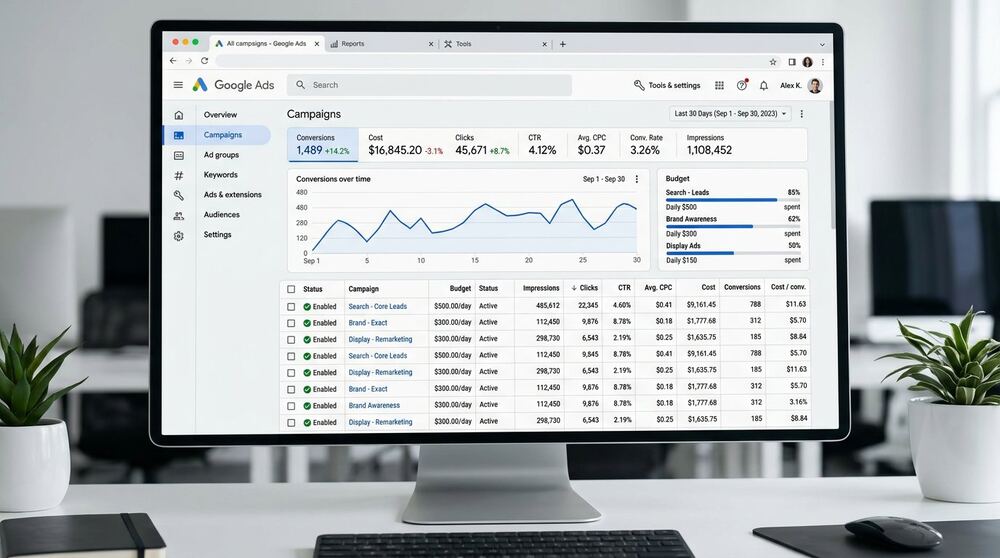
Google Ads can be the fastest customer-acquisition channel a small business ever uses — or the fastest way to burn a marketing budget. The difference is never luck. It is structure: tight keyword grouping, honest conversion tracking, disciplined budgets and weekly optimization. This guide walks through the complete management playbook I use for client accounts, written so you can audit your own campaigns or evaluate any manager you hire.
How Google Ads fits your marketing
Google captures existing demand — people actively searching for what you sell. That makes Search campaigns ideal for high-intent services (plumbers, lawyers, B2B software, clinics), while Display and YouTube work better for awareness, remarketing and visual offers. Before spending anything, confirm the demand exists: if nobody searches for your offer, Google Search cannot create customers — you need demand-creation channels like Meta Ads or SEO content first. The strategic comparison is in SEO vs Google Ads.
Account structure that scales
Clean structure is what separates managed accounts from money fires:
- One campaign per intent theme — separate brand, high-intent service, research-phase and competitor campaigns so budgets and messages stay controlled.
- Tight ad groups — a handful of closely related keywords per group, each with ads written specifically for that intent. Ten-keyword ad groups outperform hundred-keyword buckets every time.
- Match types with intent: start phrase and exact for control; expand to broad only with strong conversion data and tight negative lists.
- Negative keywords from day one — junk intent (free, jobs, careers), irrelevant geography and DIY queries blocked before they spend. Review search terms weekly and keep growing the list.
Ad copy that earns the click
- Mirror the searcher's language in headlines — message match between query, ad and landing page is the core quality-score lever.
- Lead with the outcome or differentiator, not the company name (brand campaigns excepted).
- Use every relevant extension: sitelinks, callouts, structured snippets, calls, locations. Extensions expand real estate and click-through at no extra cost.
- Test systematically: one variable at a time, responsive search ads with pinned variants only where message control demands it.
Conversion tracking: the non-negotiable foundation
Never scale a campaign without verified conversion tracking. Minimum setup: form submissions, calls (call tracking where call volume matters), and qualified-lead milestones where possible. Import offline conversions if sales close by phone — optimizing to raw leads when only some convert trains the algorithm on the wrong goal. Verify in real time: submit a test lead and watch it appear before trusting any report.
Budgets: how much to start
Start with a budget you can sustain for at least 90 days — enough to exit learning phases and gather decisions-grade data. Work backward from your target cost per qualified lead: if a lead is worth $100 and you convert 5% of clicks, your sustainable CPC ceiling is roughly $5. Below-threshold budgets produce inconclusive tests; oversized day-one budgets burn on unproven structure. Begin controlled, prove economics per campaign, then scale winners in steps.
The weekly optimization routine
- Search terms review: add negatives, harvest new exact-match positives.
- Bid and budget check: shift spend toward campaigns hitting target CPA; cap or pause chronic underperformers.
- Ad and extension review: pause weak variants, draft challengers, fill extension gaps.
- Landing page alignment: check message match and speed on pages receiving spend — see landing page principles.
- Report in plain language: spend, qualified leads, cost per lead, what changed and why.
Common Google Ads mistakes
- Running traffic to the homepage instead of message-matched landing pages.
- One campaign, one ad group, hundreds of keywords — the classic unmanaged structure.
- No negative keyword lists; paying for "free," "jobs" and DIY queries.
- Optimizing to clicks instead of qualified leads.
- Changing everything at once, so nothing is learnable.
Frequently asked questions
How much does Google Ads management cost?
My setup starts from $60 and monthly management from $100 — ad spend always separate and paid by you directly to Google. See pricing. Industry-wide, expect management to make sense when monthly spend justifies professional attention; tiny budgets often do better with a one-time setup plus coaching.
How fast do Google Ads results come?
Traffic within days; reliable cost-per-lead data within 2–6 weeks depending on volume. Judgment before the learning phase completes is just guessing.
Should I run Google Ads and SEO together?
Usually yes — ads deliver now and reveal converting keywords; SEO compounds durable visibility. The combined playbook is in SEO vs Google Ads.
Do you guarantee results from Google Ads?
No honest manager guarantees ROAS or lead volumes — offer strength, market and pricing sit outside anyone's control. What I guarantee: professional structure, disciplined testing, honest reporting and fast course-correction.
Continue reading
Related: Google Ads vs Meta Ads, the power of retargeting and landing pages that convert. Want management? See paid advertising services or book a free consultation.
Applied workbook: turn the guidance into a working plan
This section is for a small business preparing or reviewing a Google Ads account. Its purpose is to help you connect campaign structure, search intent, landing pages and conversion data. It expands the principles above into a planning document you can use with a colleague, freelancer or agency. It is not a promise of a ranking, lead volume or return. Those outcomes depend on the market, offer, website, competition, budget and quality of execution.
Use this Google Ads Management: The Complete Small-Business Guide workbook on one real priority rather than answering it in the abstract. A useful plan names the page, campaign, audience or dataset being discussed; identifies the evidence available today; and gives the next action to a specific owner. If information is missing, write that down as a research task instead of filling the gap with an assumption.
A realistic planning situation
Consider this hypothetical situation: a campaign receives clicks but mixes brand, research and purchase terms while tracking every page view as a conversion. The example is intentionally general and does not describe a named client. It shows why the topic cannot be solved by copying a template. The right response begins by separating what is known from what merely sounds plausible.
For Google Ads Management: The Complete Small-Business Guide, first describe the commercial objective in one sentence. Then describe what a useful visitor, lead or customer would do next. Finally, identify the present obstacle. It might be missing demand, weak relevance, technical friction, an unclear offer, poor measurement or insufficient follow-up. Each obstacle leads to different work, so this diagnosis prevents a tool from deciding the strategy.
For the Google Ads Management: The Complete Small-Business Guide situation, create two columns: evidence and assumptions. Evidence may include search queries, campaign terms, page behavior, sales notes, crawl output or verified records, depending on the topic. The plan should test the most important assumption while protecting what the available evidence already supports.
Information to collect before implementation
Do not wait for perfect data, but collect enough information to avoid an expensive guess about Google Ads Management: The Complete Small-Business Guide. The following inputs are specific to this topic:
- 1. offer, geography and customer economics. Note its source, date and any limitation before using it to make a decision.
- 2. keyword themes and negative terms. Note its source, date and any limitation before using it to make a decision.
- 3. ad-to-landing-page message. Note its source, date and any limitation before using it to make a decision.
- 4. primary and secondary conversion definitions. Note its source, date and any limitation before using it to make a decision.
Place the Google Ads Management: The Complete Small-Business Guide inputs in one brief. Add the target market, device or location where it changes the answer. For international work, terminology and competition can differ between the United States, United Kingdom, Canada, Australia, Europe and Bangladesh; that does not justify repeating country names throughout the copy. It means the research should reflect the audience that will actually see the page or campaign.
Finish the Google Ads Management: The Complete Small-Business Guide brief with constraints: budget, deadline, access, approval time, technical capacity and legal or platform requirements. Constraints make priorities visible and help a specialist recommend a focused first phase instead of pretending every possible task belongs in the initial scope.
Four decisions to make deliberately
1. Structure by intent
Keep tightly related searches and messages together. Write down the current evidence before changing anything. Then make one controlled decision and record who owns the next action.
Working note for Structure by intent: connect this decision to connect campaign structure, search intent, landing pages and conversion data. Record the assumption, the evidence available now and the condition that would make you revise this specific choice. That keeps the work practical and prevents a checklist from replacing judgement.
2. Read search terms
Use actual queries to add negatives and discover useful language. Apply this to the page, campaign or workflow that matters most first. A narrow test is easier to interpret than a site-wide change made without a baseline.
Working note for Read search terms: connect this decision to connect campaign structure, search intent, landing pages and conversion data. Record the assumption, the evidence available now and the condition that would make you revise this specific choice. That keeps the work practical and prevents a checklist from replacing judgement.
3. Protect conversion data
Count meaningful actions accurately and keep client account ownership. Explain the choice in plain language to the person approving the work. If the reason cannot be explained clearly, the scope probably needs more research.
Working note for Protect conversion data: connect this decision to connect campaign structure, search intent, landing pages and conversion data. Record the assumption, the evidence available now and the condition that would make you revise this specific choice. That keeps the work practical and prevents a checklist from replacing judgement.
4. Optimize after evidence
Adjust bids, ads and pages from sufficient, relevant data. Set an explicit review point. The first implementation may reveal a different constraint, so the plan should allow evidence to change the next priority.
Working note for Optimize after evidence: connect this decision to connect campaign structure, search intent, landing pages and conversion data. Record the assumption, the evidence available now and the condition that would make you revise this specific choice. That keeps the work practical and prevents a checklist from replacing judgement.
How to move from plan to implementation
Turn the four Google Ads Management: The Complete Small-Business Guide decisions into a short backlog. Each item should contain an owner, the asset or account affected, the expected user benefit, the evidence behind it and a completion check. Broad instructions such as “improve it” are not executable; name the exact page, campaign, file or workflow and the check that will close the task.
For the Google Ads Management: The Complete Small-Business Guide plan, work in dependency order. Measurement and access usually come before optimization, and a clear offer or source dataset comes before scaling distribution. The correct sequence reduces rework and makes later evidence easier to interpret.
Keep a dated change log for Google Ads Management: The Complete Small-Business Guide. Record the content, technical, tracking, audience, creative or data rule that changed—whichever applies here. Platforms change continuously, but undocumented internal releases cause just as much confusion. A log separates deliberate work from seasonality and normal fluctuation.
Review the Google Ads Management: The Complete Small-Business Guide implementation as the intended user would. Use the actual device, landing page, account view, spreadsheet or conversion path; then complete the intended task. Technical correctness matters, but the work is unfinished when a real person cannot understand or use it.
Measurement that supports a decision
A reporting dashboard for Google Ads Management: The Complete Small-Business Guide is useful only when each number changes a decision. Start with the following topic-specific measures:
- qualified conversion cost: define where the number comes from, how often it will be reviewed and what business question it answers. Compare like-for-like periods and annotate major releases or campaign changes.
- search-term relevance: define where the number comes from, how often it will be reviewed and what business question it answers. Compare like-for-like periods and annotate major releases or campaign changes.
- conversion rate by campaign: define where the number comes from, how often it will be reviewed and what business question it answers. Compare like-for-like periods and annotate major releases or campaign changes.
- lead or sales quality after the platform event: define where the number comes from, how often it will be reviewed and what business question it answers. Compare like-for-like periods and annotate major releases or campaign changes.
For Google Ads Management: The Complete Small-Business Guide, use both leading and outcome indicators. A leading indicator shows whether implementation is moving in the intended direction; an outcome indicator shows whether that direction supports the business. The measures listed above make that distinction concrete, and neither group should be interpreted alone.
Avoid presenting correlation as certainty when reporting on Google Ads Management: The Complete Small-Business Guide. Traffic, cost or conversion can change because of seasonality, competitors, pricing, creative, tracking or demand. Report the release, the observation and the next test instead of claiming credit the data cannot isolate.
Quality-control and risk review
Before calling the Google Ads Management: The Complete Small-Business Guide work complete, check for these topic-specific warning signs:
- broad matching without control. Treat this as a review trigger, not a reason to abandon the channel. Check the underlying evidence, correct the process and document what changed.
- default location settings. Treat this as a review trigger, not a reason to abandon the channel. Check the underlying evidence, correct the process and document what changed.
- counting weak actions as leads. Treat this as a review trigger, not a reason to abandon the channel. Check the underlying evidence, correct the process and document what changed.
- changing several variables daily. Treat this as a review trigger, not a reason to abandon the channel. Check the underlying evidence, correct the process and document what changed.
Also run a cross-channel check around Google Ads Management: The Complete Small-Business Guide: links should resolve to the intended URL, important content should be available on mobile, images should have accurate alternative text where needed, forms should explain what happens next, and analytics should not claim more than the implementation supports. These details affect accessibility, trust and measurement together.
Ask someone who was not involved in the Paid Ads implementation to explain the page, campaign or process after a short review. If their understanding differs from the intended message for Google Ads Management: The Complete Small-Business Guide, improve the work before adding more traffic or content. Clarity is often the cheapest useful improvement available.
A 30-day review rhythm
For Google Ads Management: The Complete Small-Business Guide, use this first-month rhythm: Days 1–3: establish the baseline and choose one priority. Days 4–10: complete the first controlled implementation and quality checks. Days 11–20: observe early signals without reacting to every daily movement. Days 21–30: compare the evidence with the original assumption and approve the next iteration.
The exact Paid Ads timing depends on how quickly reliable evidence appears. Technical defects can be verified after release, organic search effects often need longer observation, and paid campaigns still need enough qualified activity to support a decision. Review Google Ads Management: The Complete Small-Business Guide at a pace that matches the system rather than an arbitrary daily reporting habit.
Document the handover
Close the Google Ads Management: The Complete Small-Business Guide cycle with a one-page handover. List the objective, the assets or accounts changed, access ownership, the baseline date, completed checks, unresolved risks and the next review date. Attach the small number of reports or source files another person would need to continue the work. For a small business preparing or reviewing a Google Ads account, this record is especially useful because it turns Paid Ads activity into an understandable operating process instead of knowledge held by one provider. The handover should also state what was not done and why. That boundary prevents later assumptions about scope, makes future quotations easier to compare and protects authentic reporting. If a result has not yet had enough time or data to evaluate, label it as pending rather than positive or negative. Clear documentation is part of delivery, not an optional administrative extra.
Workbook questions
What should I do first?
For Google Ads Management: The Complete Small-Business Guide, start by writing the objective and collecting the four inputs above. Then choose the decision that removes the largest current uncertainty. That is usually more valuable than selecting the easiest task or the tool with the most recommendations.
How do I know whether I need professional help?
Professional support with Google Ads Management: The Complete Small-Business Guide is useful when access, technical implementation, research depth or ongoing management exceeds the time and skills available internally. Ask for a written scope, named deliverables, ownership and reporting method. You should understand the Paid Ads work even when you are not doing it yourself.
Can this process guarantee a result?
No. This Google Ads Management: The Complete Small-Business Guide process improves decision quality and implementation discipline; it cannot control competition, platform auctions, algorithm changes, customer demand or sales follow-up. Be cautious with anyone who guarantees rankings, leads or revenue without those dependencies.
How does Prosengit Kundu approach this work?
For work related to Google Ads Management: The Complete Small-Business Guide, Prosengit Kundu connects the Paid Ads decision with its technical destination where relevant: content, advertising, social or YouTube marketing, B2B research, and custom HTML/CSS/JavaScript or WordPress development. The scope begins with the goal and available evidence. Review the digital marketing and website services, see related case studies, or describe the project.
Work With Me
Enjoyed this guide? I provide freelance SEO, international SEO, custom HTML/CSS/JavaScript web development, Google & Meta Ads management, B2B lead generation and complete digital growth plans — for clients in Bangladesh and remotely worldwide.